Know who is calling before you answer
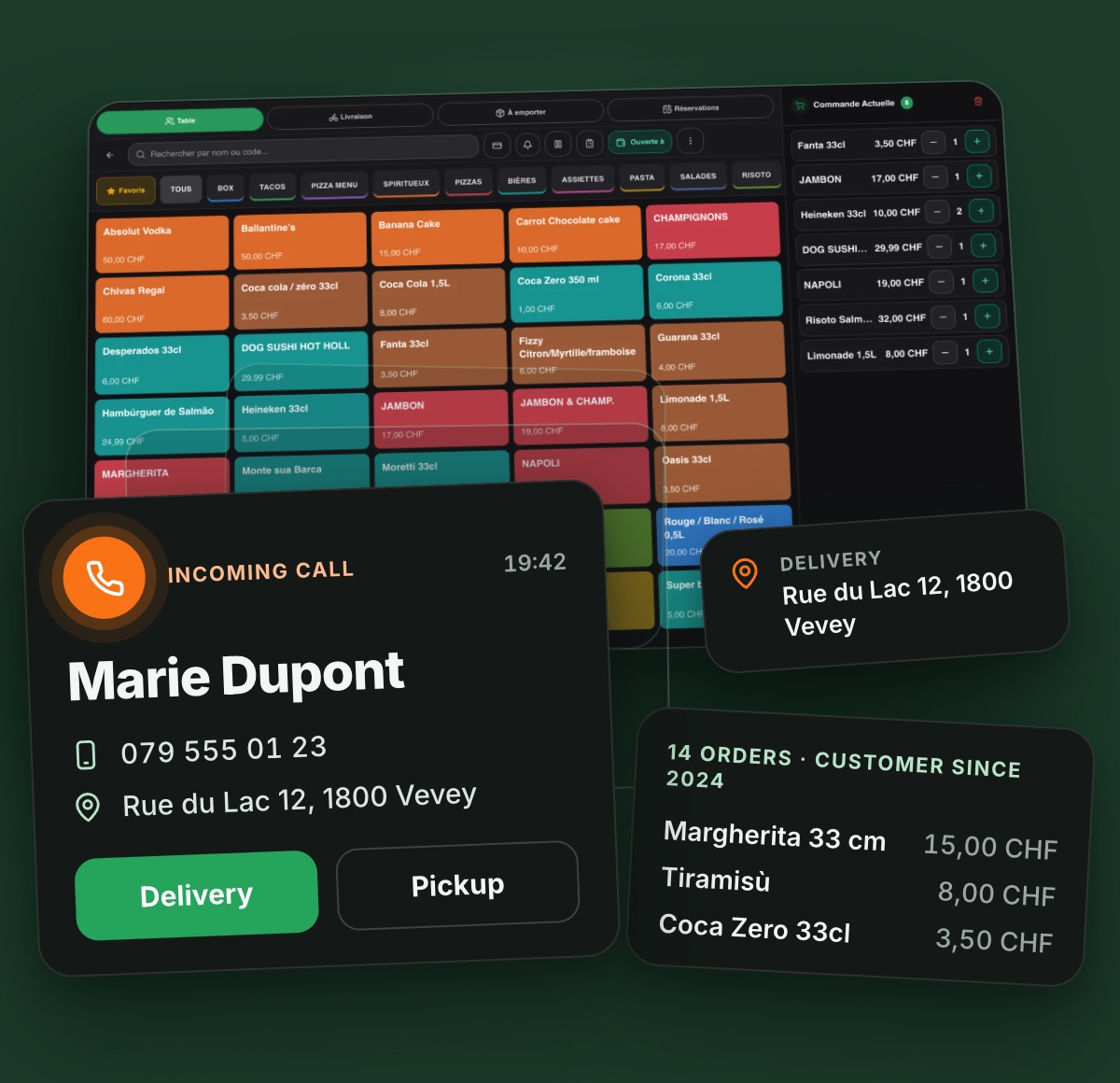
When the restaurant phone rings, MyMenuo shows on the checkout who the customer is, what they usually order and where to deliver. A phone order is taken in seconds, without asking everything again.
Everything it does
Shows the customer right away. Name, phone number and customer record appear on the checkout as soon as the phone rings.
Brings up the order history. The last orders are in view, so you can repeat the usual without reading out the menu.
Already knows the address. The last delivery address comes filled in; your staff only confirms it.
Opens the order in one tap. Choose delivery or pickup and the order starts with the right customer.
Registers first-time callers. A new customer joins your CRM when the order is completed, ready for the next call.
Keeps a call history. 30 days of answered and missed calls, with search, export and a called-back mark.
Rings only on the right checkout. With more than one checkout, each device chooses the extensions it wants to see.
How it works
A customer calls the restaurant's number.
Go Integrator, on the checkout PC, notifies the MyMenuo connector.
The web checkout shows who is calling; the cashier picks takeaway or delivery and confirms the address.
What changes in your day
Faster service
Less time per call at rush hour and a shorter queue on the phone.
Fewer address mistakes
The address comes from the customer record, not from a note scribbled in a hurry.
Customers feel recognised
Greeting them by name and remembering the usual order brings them back.
No sale forgotten
Missed calls stay listed until someone calls back.
Never miss an order again
With the MyMenuo virtual attendant, the phone never goes unanswered: it answers up to 20 calls at the same time, takes the order and sends it straight to the checkout. Available as an add-on with any paid plan.
AI receptionist: it answers the calls nobody can takeWhat you need
- MyMenuo Pro Max or Business plan.
- A compatible business phone line (for example, Swisscom with Go Integrator).
- A Windows PC at the checkout.
- Our team sets it up together with you.
Compatible operators by country
🇺🇸 United States
- NextivaNextiva VoiceOperator offers Go Integrator
- Evolve IPHosted voice (CX Integration)Operator offers Go Integrator
- Momentum TelecomMomentum UCaaSOperator offers Go Integrator
Other countries
🇫🇷 France
- SFR BusinessCisco Webex CallingLikely: confirm with the operator
- Orange BusinessWorkplace Together Webex (Webex Calling)Likely: confirm with the operator
🇩🇪 Germany
- Deutsche TelekomCloud PBX 2.0 (DeutschlandLAN)Operator offers Go Integrator
- PlusnetCentraflexOperator offers Go Integrator
🇮🇹 Italy
- Fastweb + VodafoneNeXXt CommunicationLikely: confirm with the operator
🇳🇱 Netherlands
🇵🇱 Poland
- NetiaNetia Unified Communications (Webex)Likely: confirm with the operator
🇸🇰 Slovakia
- Slovak TelekomMagenta Office (Cloud PBX)Likely: confirm with the operator
🇪🇸 Spain
- Telefónica TechCisco Webex CallingLikely: confirm with the operator
🇨🇭 Switzerland
- SwisscomSmart Business Connect «standard»Tested by MyMenuo
🇬🇧 United Kingdom
- BT BusinessBT Cloud VoiceOperator offers Go Integrator
- Virgin Media O2 BusinessCloud VoiceOperator offers Go Integrator
- JolaJolaPhoneOperator offers Go Integrator
- VanillaIPHosted BroadWorks (via resellers)Operator offers Go Integrator
- IC (BT Wholesale)IC-talk Cloud Phone System (Hosted Centrex)Operator offers Go Integrator
- GammaGamma HorizonLikely: confirm with the operator
In any country: Cisco Webex Calling. If your operator provides Cisco Webex Calling, Go Integrator for Webex Calling (Team or Unite) is sold directly by its vendor. Not yet tested with the MyMenuo connector. Go Integrator for Webex Calling Team / Unite
Solo licences do not include Call Events: order Team or Unite. List compiled from operators' public pages in September 2026. Plans and licences change: confirm with the operator before ordering. Only Swisscom has been tested with a real call.
FAQ
United States: which phone operators does Caller ID work with?
Caller ID needs a business phone line that can send call events to a computer, through Go Integrator (Team or Unite licence) or a compatible connector. It has been validated in a real restaurant on a Swisscom line; the operators listed on this page offer the same technology. Our team confirms what is available for your line before you start.
Do I have to change my phone number or my operator?
No. The restaurant keeps its number. If your current line is compatible, Caller ID is connected to it. If it is not, we tell you which line option works.
What do I need at the restaurant?
A Windows PC at the counter running the MyMenuo connector, a compatible phone line and the Pro Max or Business plan. The installation is done together with our team.
What happens when a new customer calls?
The till shows the number as a new caller. You enter the name and address once while taking the order, and the next call from that number already shows everything.